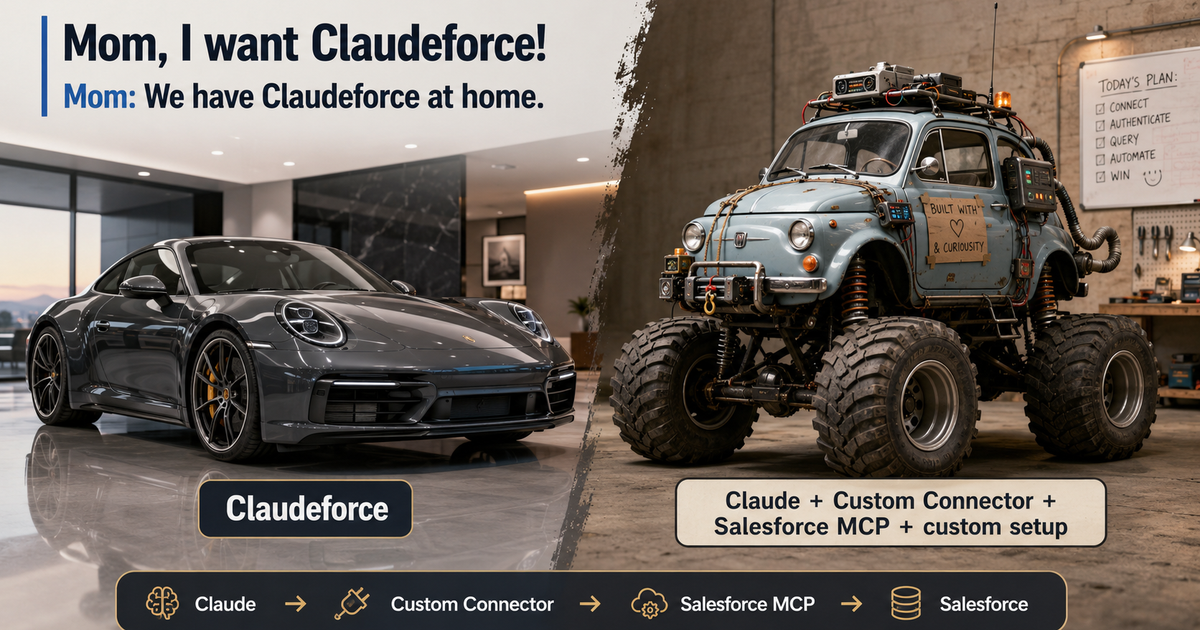
Mom, I want Claudeforce! Mom: we have Claudeforce at home 😎
Salesforce and Anthropic have just announced Claudeforce. It sounds great: Claude working directly with Salesforce data, understanding CRM context, and taking actions without forcing users to constantly switch between systems.
The first part of the partnership will be Salesforce in Claude – an integration with 37 prebuilt sales skills that can help Claude analyze sales data and perform controlled actions in Salesforce. There is just one problem: it is not broadly available yet. An open beta was announced for September 2026.
So do we have to wait? Not necessarily.
Let’s build Claudeforce at home
Salesforce already provides official Hosted MCP Servers, and Claude supports MCP (Model Context Protocol).
You can think of MCP as a standard communication layer between an AI model and external systems. Instead of building a separate REST integration for every capability, you expose a set of tools that the model can call at the right moment in a conversation. Salesforce Hosted MCP Servers make it possible to securely connect an AI client to Salesforce data, logic, and automation.
Claude → Custom Connector → Salesforce Hosted MCP Server → Salesforce
And this works today!
How do you configure it?
On the Salesforce side, you primarily need an OAuth-enabled External Client App and an active Hosted MCP Server.
Then, in Claude, go to: Customize → Connectors → Add custom connector and provide the Salesforce MCP server URL.
For example, the production endpoint for full SObject access looks like this:
https://api.salesforce.com/platform/mcp/v1/platform/sobject-all
Salesforce provides several server variants:
- sobject-reads – read-only access
- sobject-mutations – create and update
- sobject-deletes – delete operations
- sobject-all – full CRUD, query, and search
That matters because you do not need to give AI full CRUD access from day one. If your goal is only CRM analysis, you can start with sobject-reads.
What can Claude actually do with it?
Once the connection is configured, you can start interacting with Salesforce using natural language.
“Show me all open Opportunities above 500,000 and group them by owner.”
Claude can use the appropriate MCP tools, inspect Salesforce structure, run the query, and return the result. With sobject-all, you can go further.
“Find all Accounts with no activity in the last 90 days and create follow-up tasks for their owners.”
SObject All supports create, read, update, delete, query, search, and work across record relationships.
You can also try the following prompt:
“From now on, I’m not going to log in to Salesforce anymore. Every day at 9 a.m., log in for me, move the mouse around a bit, create some random task, and change the stage of a random Lead. Don’t tell my boss anything.”
But I can’t guarantee it’ll work for you! ;)
What about security?
This is one of the most important parts. MCP does not mean Claude receives some kind of “super-admin API”. Operations run in the context of the authenticated Salesforce user. Standard Salesforce security still applies:
- Object Permissions
- Field-Level Security
- Sharing Rules
If a user cannot edit a particular field or record in Salesforce, the agent should not be able to perform that operation through MCP either. That is exactly why this architecture is more interesting than simply wiring an LLM directly to a REST API.
Is this Claudeforce?
No! Claudeforce is expected to provide prebuilt skills, simpler onboarding, centralized management, and a much more polished user experience. But the core idea – Claude + Salesforce data + Salesforce actions + governance – is something you can already experiment with today using Salesforce Hosted MCP Servers.
Mom, I want Claudeforce! Mom: we have Claudeforce at home. And you know what? The homemade version is actually also pretty good! ;)
Sources
- Official Claudeforce announcement of Salesforce + Anthropic. This includes information about the 37 ready-made sales skills, the pilot program, and the open beta planned for September 2026. https://www.salesforce.com/news/press-releases/2026/08/26/salesforce-and-anthropic-announce-claudeforce/
- Salesforce Hosted MCP Servers overview. Official explanation of what Salesforce Hosted MCP Servers are and how they allow clients such as Claude to connect to Salesforce via MCP and OAuth. https://developer.salesforce.com/docs/platform/hosted-mcp-servers/guide/hosted-mcp-servers-overview.html
- How to connect Claude to Salesforce MCP. Documentation explaining how to configure Claude as an MCP client. https://developer.salesforce.com/docs/platform/hosted-mcp-servers/guide/claude.html
- SObject All MCP Server. Documentation for the server that supports operations on Salesforce objects, including query, search, and CRUD operations. https://developer.salesforce.com/docs/platform/hosted-mcp-servers/guide/sobject-all.html
- Salesforce products and capabilities supporting MCP. Here, Salesforce describes the broader range of platform features and components that can be exposed through MCP. https://developer.salesforce.com/docs/platform/hosted-mcp-servers/guide/products-supporting-mcp.html