
"Fields Being Inaccessible” Error After Salesforce Summer ’26 — Why It Happens and How to Fix It
In Summer '26 (API 67.0), a major change to database operations was delivered. Up to that point, the default mode for DML was System Mode. From now on, every new class we create will run DMLs by default in User Mode, enforcing Field-Level Security (FLS).
Thrown error on harmless record update
That change to the database mode makes the following code fail, despite running perfectly fine in API 66.0 and before.
OrderItem orderItemRecord = [SELECT Id, Description, Order.Status FROM OrderItem LIMIT 1];
orderItemRecord.Description += orderItemRecord.Order.Status;
update orderItemRecord;
The thrown exception indicates inaccessible fields:
System.DmlException: Operation failed due to fields being inaccessible on Sobject OrderItem, check errors on Exception or Result!
Why does the error occur?
In the above example with OrderItem, we are querying a field from the parent, Order.Status. Whenever a Parent's field is being queried, Salesforce silently stores the Parent's ID in the relationship field.
OrderItem child = [SELECT Id, Description, Order.Status FROM OrderItem LIMIT 1];
System.debug('orderItem: ' + child);
// orderItem: OrderItem:{Id=802Qy00000Z6JlNIAV, OrderId=801Qy00002IhWasIAF}
Moreover, Salesforce stores the nested Parent object on the record too. It can be seen when we use JSON serialization:
{ ...
  "OrderId" : "801Qy00002IhWasIAF",
  "Order" : {
    "attributes" : {
      "type" : "Order",
      "url" : "/services/data/v67.0/sobjects/Order/801Qy00002IhWasIAF"
    },
    "Id" : "801Qy00002IhWasIAF",
    "Status" : "Draft"
  }
}
As we try to do the record update afterwards, Salesforce checks the Field-Level Security due to the User Mode, and every passed field is being considered.
Therefore, the OrderId field needs to pass the check, and that's the problem: it is a nonreparentable field. Database constraints forbid moving an existing OrderItem to another Order, and even the System Administrator profile with Modify All permission won't help here. From the UI, the field is not editable as well:
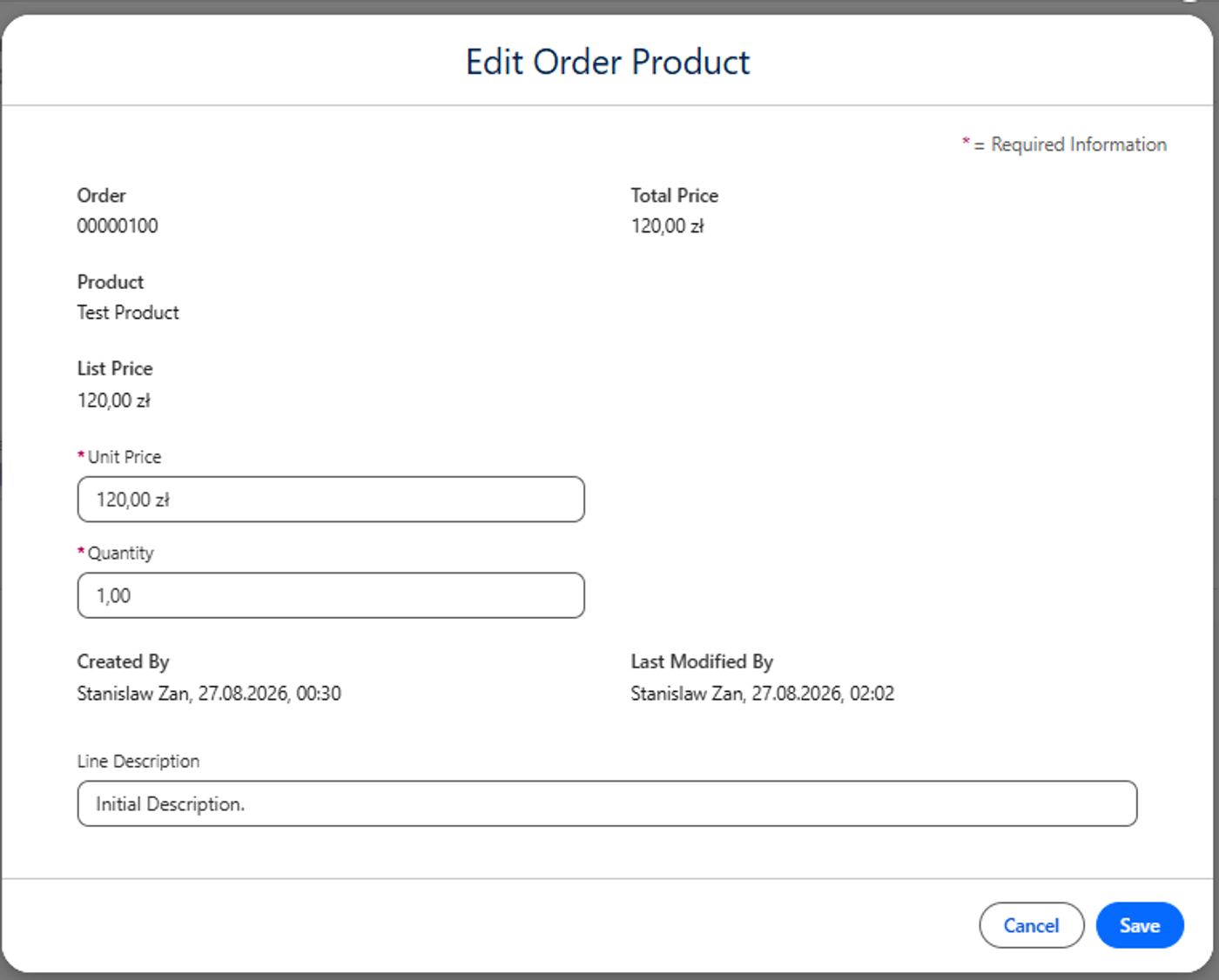
Despite not changing the OrderId value at all, passing that field to the update or upsert calls forces the FLS check!
This error will occur on every relationship field that is not reparentable, which are:
- all custom Master-Details that have the checkbox Reparentable Master Detail / Allow reparenting set to false
- standard non-reparentable relationship fields, for example:
- All ContentDocumentLink relationships
- All ParentId on Share objects
- Line Items: ContractLineItem (ServiceContractId), FeedItem (FeedId), OpportunityLineItem (OpportunityId, PricebookEntryId, Product2Id), OrderItem (OrderId, PricebookEntryId, Product2Id, OriginalOrderItemId), QuoteLineItem (OpportunityLineItemId, PricebookEntryId, Product2Id, QuoteId), WorkOrderLineItem (WorkOrderId)
- Many more standard objects
A similar error will be thrown for other non-updateable fields, like audit fields, Formulas, AutoNumbers or Roll-up Summaries.
Anonymous Console
Apparently, that error is not thrown in Anonymous Console unless we explicitly declare to run the update in User Mode:
update as user orderItemRecord;This is unusual, as Salesforce indicates that Anonymous Console runs in User Mode by default.
Sadly, I am unable to find a link for it, but I'm convinced it was in the documentation some time ago!
How to solve?
The main issue is passing a non-updatable field to the update statement. However, as we saw, we can pass it implicitly, just by referencing any of the parent's fields.
If we try to set that field to NULL before the update, the database engine interprets that we want to make the OrderItem parentless, which is not allowed as the relation with Order is mandatory. Upon trying, a new Exception is thrown:
orderItemRecord.OrderId = null;
// System.SObjectException: Field is not writeable: OrderItem.OrderId
So we must remove the OrderId field completely before passing it to the update statement. Happily, there are a few ways to do so.
SObject constructor and SObjectType.newSObject()
The easy way, if we know everything beforehand, is to use either the standard SObject constructor or dynamically create the record with record.SObjectType.newSObject().
OrderItem orderItemRecord = [SELECT Id, Description, Order.Status FROM OrderItem LIMIT 1];
OrderItem cleanOrderItem = new OrderItem(Id = orderItemRecord.Id);
cleanOrderItem.Description = orderItemRecord.Description + orderItemRecord.Order.Status;
update cleanOrderItem;
More dynamic, by using SObjectType.newSObject:
OrderItem orderItemRecord = [SELECT Id, Description, Order.Status FROM OrderItem LIMIT 1];
OrderItem cleanOrderItem = (OrderItem) OrderItem.SObjectType.newSObject(orderItemRecord.Id);
cleanOrderItem.Description = orderItemRecord.Description + orderItemRecord.Order.Status;
update cleanOrderItem;
Populating all fields dynamically
The above option may not be sufficient if we do not know what exact fields we have to update. In that situation, we need to use a more dynamic approach to:
- Check what fields were populated,
- Check whether they are possible to update,
- Do not pass the nested Parent Object reference, like OrderItem.Order or Child__c.Parent__r.
We could think Salesforce already provided us such a tool with Security.stripInaccessible(), but it does not work due to condition 3 not being fulfilled — the nested Parent is still on the record, more on that below in the "What does not work" section.
If Salesforce does not hand us a method for it, we need to write it ourselves. It can look like that:
public static SObject clearValues(SObject record, AccessType operationType) {
    if (operationType == null) {
        throw new IllegalArgumentException('Invalid Operation Type! Passed value: null');
    }
    if (record == null) {
        throw new IllegalArgumentException('Invalid Record! Passed value: null');
    }

    SObject cleanRecord = record.getSObjectType().newSObject(record?.Id);
    Map<String, Object> populatedFields = record.getPopulatedFieldsAsMap();
    Map<String, SObjectField> fieldsOnObject = record.getSObjectType().getDescribe().fields.getMap();

    for (String populatedField : populatedFields.keySet()) {
        DescribeFieldResult fieldResult = fieldsOnObject.get(populatedField)?.getDescribe();
        if (fieldResult == null) {
            continue; // Avoiding Parent Object fields, like OrderItem.Order, Child__c.Parent__r
        }

        final Boolean shouldPutValue;
        switch on operationType {
            when UPDATABLE {
                shouldPutValue = fieldResult.isUpdateable();
            }
            when CREATABLE {
                shouldPutValue = fieldResult.isCreateable();
            }
            when UPSERTABLE {
                shouldPutValue = cleanRecord.Id == null
                    ? fieldResult.isCreateable()
                    : fieldResult.isUpdateable();
            }
            when READABLE {
                shouldPutValue = fieldResult.isAccessible();
            }
            when else {
                throw new IllegalArgumentException('Operation Type not handled! Passed Operation Type: ' + operationType);
            }
        }

        if (shouldPutValue) {
            cleanRecord.put(populatedField, populatedFields.get(populatedField));
        }
    }

    return cleanRecord;
}
JSON serialization
Another way is to serialize the record to a String, remove unwanted elements, and deserialize it again. It is the least performant way, however, I see it might be used in the following scenarios:
- We are exposing some endpoint that accepts the record data, so we already have the serialized String
- We are doing some dynamic Apex and already using serialization to get rid of other Salesforce boilerplates
- We are already using serialization to prepare Test Data with relationships, as Apex still is not able to populate children relationships in-memory (see here)
The simple code for that would be:
OrderItem orderItemRecord = [SELECT Id, Description, Order.Status FROM OrderItem LIMIT 1];
orderItemRecord.Description += orderItemRecord.Order.Status;

Map<String, Object> recordMap = (Map<String, Object>) JSON.deserializeUntyped(JSON.serialize(orderItemRecord));
recordMap.remove('Order');
recordMap.remove('OrderId');

OrderItem orderItemDeserialized = (OrderItem) JSON.deserialize(JSON.serialize(recordMap), OrderItem.class);
update orderItemDeserialized;
And a more generalized version:
public static SObject removeFields(SObject record, Schema.SObjectField fieldToRemove) {
    return removeFields(record, new Set<Schema.SObjectField>{ fieldToRemove });
}

public static SObject removeFields(SObject record, Set<Schema.SObjectField> fieldsToRemove) {
    if (record == null || fieldsToRemove == null || fieldsToRemove.isEmpty()) {
        return record;
    }

    Map<String, Object> recordMap = (Map<String, Object>) JSON.deserializeUntyped(JSON.serialize(record));
    Set<String> keysToRemove = new Set<String>();

    for (Schema.SObjectField fieldToken : fieldsToRemove) {
        Schema.DescribeFieldResult describeResult = fieldToken.getDescribe();
        keysToRemove.add(describeResult.getName());

        String relationshipName = describeResult.getRelationshipName();
        if (relationshipName != null) {
            keysToRemove.add(relationshipName);
        }
    }

    recordMap.keySet().removeAll(keysToRemove);

    Type targetType = Type.forName(record.getSObjectType().toString());
    System.debug(recordMap);

    return (SObject) JSON.deserialize(JSON.serialize(recordMap), targetType);
}

// Usage
OrderItem orderItemRecord = [SELECT Id, Description, Order.Status FROM OrderItem LIMIT 1];
orderItemRecord.Description += orderItemRecord.Order.Status;

OrderItem cleanedItem = (OrderItem) removeFields(orderItemRecord, OrderItem.OrderId);
update cleanedItem;
System Mode
The last way in making it work like before API 67.0 is by performing DML in System Mode.
OrderItem orderItemRecord = [SELECT Id, Description, Order.Status FROM OrderItem LIMIT 1];
orderItemRecord.Description += orderItemRecord.Order.Status;
update as system orderItemRecord; // Success!
Despite being the easiest one, we can introduce a bug by not respecting the Field-Level Security on all other fields we pass.
What does not work?
The following ways are sadly not clearing the field properly:
- record.clone(false, false) — regardless of the values passed into the preserveId and deep parameters, the OrderId field was still there.
- When using serialization, removing only OrderId does not work. The nested JSON with Order data must be removed as well.
- Security.stripInaccessible() — it does remove the OrderId field, but the nested Order.Id is not removed, causing the update to fail with the same "Operation failed due to fields being inaccessible".
OrderItem orderItemRecord = [SELECT Id, Description, Order.Status FROM OrderItem LIMIT 1];
orderItemRecord.Description = orderItemRecord.Description + orderItemRecord.Order.Status;

OrderItem cleanOrderItem = (OrderItem) Security.stripInaccessible(
    AccessType.UPDATABLE,
    new List<SObject>{ orderItemRecord }
).getRecords()[0];

System.debug(cleanOrderItem);
// OrderItem:{Description=Draft, Id=802Qy00000Z6JlNIAV}

System.debug(JSON.serialize(cleanOrderItem));
// {...,"Order":{...,"Status":"Draft","Id":"801Qy00002IhWasIAF"},"Description":"Initial Description.Draft","Id":"802Qy00000Z6JlNIAV"}

update cleanOrderItem; // Operation failed due to fields being inaccessible
However, there is a way to clean it further and make it work. It requires an additional line of parentField = null; code for each of the Parent fields, before the stripping:
OrderItem orderItemRecord = [SELECT Id, Description, Order.Status FROM OrderItem LIMIT 1];
orderItemRecord.Description = orderItemRecord.Description + orderItemRecord.Order.Status;
orderItemRecord.Order = null; // Cleaning nested object

OrderItem cleanOrderItem = (OrderItem) Security.stripInaccessible(
    AccessType.UPDATABLE,
    new List<SObject>{ orderItemRecord }
).getRecords()[0];

update as user cleanOrderItem; // Works!
If we do that cleaning after the strip, we will get the error again. So, for a query like SELECT Order.Status, Product2.Name, PricebookEntry.Name FROM OrderItem LIMIT 1 we need an additional cleaning line for the .Order, .Product2 and .PricebookEntry fields.
Can a Lookup forbid reparenting?
From the permissions level, sadly not. Field-Level Security can be set to either Read or Edit, and the latter contains both Createable and Updateable permissions.
It can be done using Validation Rules, a Before-Update Trigger Flow throwing a Custom Exception, or with an Apex Trigger by record.addError().
childRecord.addError(ChildObject__c.ParentLookup__c, 'Record cannot be reparented!');Detecting whether the field will block the update
Getting the Describe of an SObjectField (DescribeFieldResult) allows us to see whether the field behaves in the way described above. Use the following code to get fields that will throw either the error above or "Field is not writeable":
List<String> sobjectNames = new List<String>{
    'ContractLineItem', 'CampaignMember', 'OpportunityLineItem', 'OrderItem',
    'PricebookEntry', 'WorkOrderLineItem', 'ContentDocumentLink', 'ContractContactRole',
    'AssetRelationship', 'QuoteLineItem', 'ContentVersion', 'CaseComment'
};

Map<String, List<String>> nonUpdateableFields = new Map<String, List<String>>();

for (DescribeSObjectResult sObjectResult : Schema.describeSObjects(sobjectNames)) {
    List<String> nonUpdateableFieldsInSobject = new List<String>();
    nonUpdateableFields.put(sObjectResult.getName(), nonUpdateableFieldsInSobject);

    for (SObjectField sObjectField : sObjectResult.fields.getMap().values()) {
        DescribeFieldResult describeFieldResult = sObjectField.getDescribe();
        if (
            describeFieldResult.getType() == DisplayType.REFERENCE
            && describeFieldResult.isUpdateable() == false
            && !(new Set<String>{ 'LastModifiedById', 'CreatedById' }.contains(describeFieldResult.getName()))
        ) {
            String fieldType = describeFieldResult.getReferenceTo().size() == 1
                ? describeFieldResult.getReferenceTo().toString()
                : '(...Polymorphic)';
            nonUpdateableFieldsInSobject.add(describeFieldResult.getName() + ' ' + fieldType);
        }
    }
}

System.debug(JSON.serializePretty(nonUpdateableFields));
It returns the following JSON:
{
  "CaseComment" : [ "ParentId (Case)" ],
  "ContentVersion" : [ "ContentDocumentId (ContentDocument)", "ContentBodyId (ContentBody)", "ContentModifiedById (User)", "FirstPublishLocationId (...Polymorphic)" ],
  "AssetRelationship" : [ "AssetId (Asset)" ],
  "ContractContactRole" : [ "ContractId (Contract)" ],
  "ContentDocumentLink" : [ "LinkedEntityId (...Polymorphic)", "ContentDocumentId (ContentDocument)" ],
  "WorkOrderLineItem" : [ "WorkOrderId (WorkOrder)", "RootWorkOrderLineItemId (WorkOrderLineItem)" ],
  "PricebookEntry" : [ "Pricebook2Id (Pricebook2)", "Product2Id (Product2)" ],
  "QuoteLineItem" : [ "QuoteId (Quote)", "PricebookEntryId (PricebookEntry)", "OpportunityLineItemId (OpportunityLineItem)", "Product2Id (Product2)" ],
  "OrderItem" : [ "Product2Id (Product2)", "OrderId (Order)", "PricebookEntryId (PricebookEntry)", "OriginalOrderItemId (OrderItem)" ],
  "OpportunityLineItem" : [ "OpportunityId (Opportunity)", "PricebookEntryId (PricebookEntry)", "Product2Id (Product2)" ],
  "CampaignMember" : [ "CampaignId (Campaign)", "LeadId (Lead)", "ContactId (Contact)", "LeadOrContactId (...Polymorphic)", "LeadOrContactOwnerId (...Polymorphic)" ],
  "ContractLineItem" : [ "ServiceContractId (ServiceContract)", "Product2Id (Product2)", "RootContractLineItemId (ContractLineItem)" ]
}
The same can be described via API, using the standard endpoint /services/data/v67.0/sobjects/<SObjectName>/describe, getting the fields section and filtering on:
- updateable == false,
- type == 'reference',
- name NOT IN ('LastModifiedById', 'CreatedById')
Summary
So, what we have learned:
- Default User Mode in API 67.0: every new Apex class now enforces FLS on DML operations by default, breaking existing patterns where queried parent data silently lived on the updated instance.
- Parent cross-object SOQL queries implicitly populate hidden parent lookup fields and nested objects that fail FLS checks during User Mode DMLs.
- Affected fields include non-reparentable Master-Details, line item references (OrderItem.OrderId, OpportunityLineItem.OpportunityId), audit fields, and formulas.
- Standard workarounds like record.clone() or standalone Security.stripInaccessible() fail to clear the nested relationship data.
- You can resolve this by updating through a clean SObject instance (new OrderItem(Id = ...)), removing keys dynamically via Describe/JSON serialization, or explicitly executing update as system.
Current jobs: Developer
Salesforce Developer with Java (f/m/x)
Sii Polska
Lead Salesforce Developer
EPAM Systems
Salesforce/Devops Engineer
Deloitte
Salesforce Developer (f/m/x)
Sii Polska